Updated 26 October 2026: added what the attacks have actually achieved so far (not much, yet), and a new upload-progress flaw, CVE-2026-115560, that the 21 October patches don’t fix. See Updates at the end.
If your website runs on PHP (and if it’s WordPress, it does), check your PHP version today. It takes two minutes.
On 21 October 2026 the PHP project released emergency fixes for two critical flaws now being called PHP2Shell. They’re tracked as CVE-2026-109618 and CVE-2026-109619, both rated 9.2 out of 10, and both can let an attacker run their own code on your web server without logging in. Attackers are already trying them on a huge scale.
What is PHP2Shell?
Most security problems you hear about are in a plugin or a theme. This one isn’t. It’s in PHP itself, the engine that runs WordPress, Drupal, Joomla, Magento and millions of custom sites.
In plain English:
- CVE-2026-109618: if PHP runs out of memory at exactly the wrong moment, it can be tricked into treating half-built data as valid. An attacker can use that to take over the process.
- CVE-2026-109619: leftover data from one web request can be picked up by the next request on the same PHP worker, after that memory has already been freed. Again, that can be turned into running code.
The bad news: it doesn’t matter how well your website is written. A perfectly patched WordPress site with zero dodgy plugins is still exposed if the PHP underneath it isn’t patched. Researchers have shown it working in the lab against WordPress, Drupal, Joomla and Magento.
Is it actually being exploited?
It’s being attempted, a lot. Whether anyone has actually broken into a server with it is another question.
- Attempts started early. Details leaked before the planned release date, and Amazon’s threat intelligence team saw an attempt on 17 October, four days before the fix was public. Cloudflare saw thousands of attempts in the hours before the release and millions by the next day.
- No confirmed break-ins yet. As of 23 October, security firms watching this (CrowdStrike, Sophos and the honeypot operators) were seeing scanning, probing and failed attempts, but no confirmed successful attack on a real server.
- It’s harder than it sounds. CrowdStrike says the public exploit code mostly just crashes PHP. Turning it into a working takeover means tuning it to the exact PHP version, operating system libraries and application on the target, so there’s no one-size-fits-all attack. Sophos said its own team found building a working exploit harder than expected.
- But working exploits do exist. Researchers have built ones that work in the lab, including one that gets around a key memory protection, and botnet operators (Mirai-style malware) are trying to use it to install their software.
So is it overhyped? Partly. It isn’t another Log4Shell, where attackers were breaking into servers within hours. But “hard to exploit” isn’t “can’t be exploited”. Censys still counted over 34 million PHP services running unpatched versions on 23 October, and the most predictable setups, like an unmodified Docker image or a standard host build, are exactly the ones attackers can tune for. The fix is a routine update, so there’s no reason to wait and see.
If a server of yours was unpatched and exposed, it’s still worth treating 17 October as the start date for any check for compromise.
Am I affected?
Probably, unless your host has already patched. It affects every way PHP serves web pages: PHP-FPM (the most common setup with Nginx), Apache with mod_php (the highest risk, because the attack fires before your site’s code even runs), php-cgi, LiteSpeed and FrankenPHP. Affected code goes all the way back to PHP 5.4.
The fixed versions are:
- PHP 8.5.12 or later
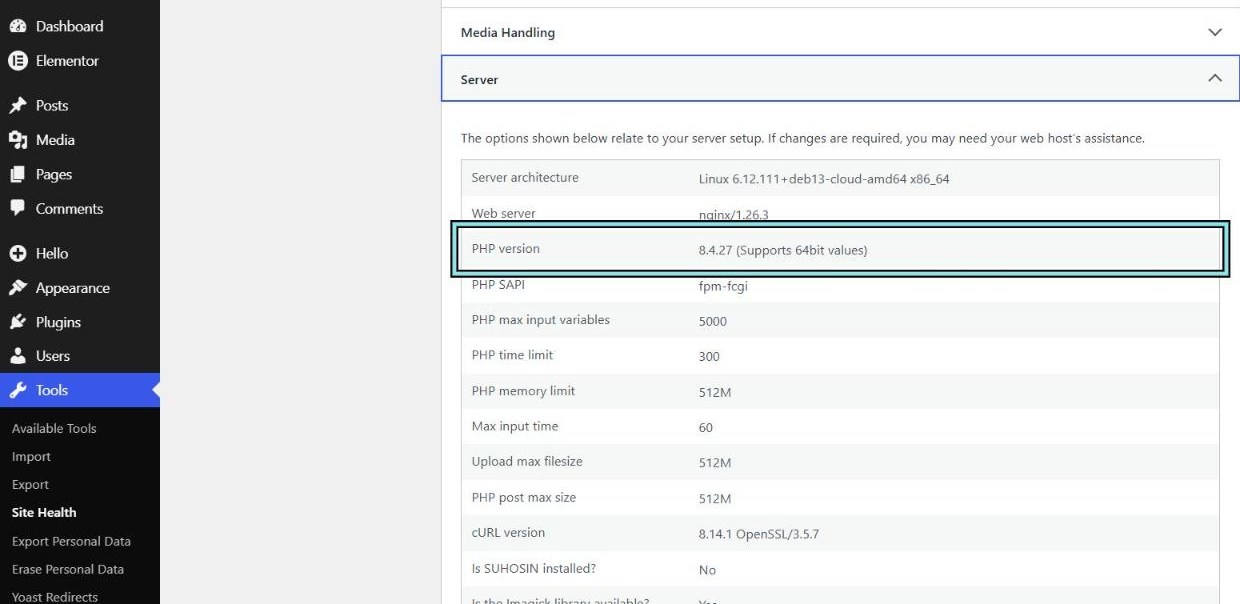
- PHP 8.4.27 or later
- PHP 8.3.36 or later
- PHP 8.2.35 or later
PHP 7.4, 8.0 and 8.1 are end of life. There’s no official release for them, just source code patches for people who compile PHP themselves. Anything older than 7.4 gets nothing at all. If you’re on one of these, see our post on end-of-life PHP.
Note: Linux distributions such as Debian, Ubuntu and AlmaLinux often backport the fix into their own package, so your version number may look different. Check your host’s or distribution’s security notice rather than going on the number alone.
How to check your PHP version in WordPress
- Log in to WordPress.
- Go to Tools → Site Health → Info.
- Open the Server section and look at PHP version.
If you’re on shared hosting, you probably can’t patch PHP yourself. Your host has to. Send them something like this:
“Hi, can you confirm the server my site is on has been patched for PHP2Shell (CVE-2026-109618 and CVE-2026-109619)? Which PHP version and package is it running, and when was it updated? And have you turned off session.upload_progress for CVE-2026-115560 until PHP releases a fix?”
A good host will answer that the same day. If they can’t, that tells you something too.
What if I can’t patch straight away?
The PHP team is very clear that updating is the only complete fix. If you’re stuck for a day or two, these reduce your exposure (they don’t make you safe):
- Put the site behind Cloudflare. Cloudflare has pushed out WAF rules for the known attack patterns, and they’re available on every plan, including Free. That only helps for traffic that actually goes through Cloudflare, which leads to the next point.
- Lock down your origin. If attackers can reach your server’s IP directly, they skip Cloudflare entirely. We wrote about this in How to lock down your origin server behind Cloudflare, and it’s never been more relevant.
- Turn off session upload progress. If you control
php.ini, setsession.upload_progress.enabled = 0(andfatal_error_backtraces = 0on PHP 8.5) and restart PHP. This closes off one known path for CVE-2026-109619, and it’s also the only fix for CVE-2026-115560 (below), so it’s worth doing even on a patched server. - Take it offline. Both the UK’s NCSC and CERT-EU suggest taking unpatchable systems off the internet until they’re fixed. Harsh, but a holding page beats a hacked server.
The follow-up flaw: CVE-2026-115560
Two days after the PHP2Shell patches, on 23 October, the PHP project published a notice about a related flaw in PHP’s session upload progress feature, tracked as CVE-2026-115560. The important part: the 21 October releases don’t fix it. It affects fully patched PHP, including 8.5.12 and 8.4.27, and the fix will come in PHP’s next regular release, which doesn’t have a date yet.
Before you panic, PHP itself calls it unlikely in practice. A site is only exposed if its code changes PHP’s session serializer while it’s running, which almost nothing does. WordPress core doesn’t use PHP sessions at all, though some plugins do. Nobody has reported it being attacked.
The fix is the same setting as above: session.upload_progress.enabled = 0, set in php.ini or your PHP-FPM pool (not in your site’s code, because it has to apply before the request is read), then restart PHP. Very few sites use the feature, so turning it off rarely breaks anything. On shared hosting, it’s one more thing to ask your host.
Check Cloudflare is actually blocking it
Cloudflare added seven managed rules for PHP2Shell, all called “PHP Remote Code Execution Attack (CVE-2026-109618, CVE-2026-109619)”, with #2 to #7 on the end of the later ones. Which set you have depends on your plan:
- Free plan: the rules are in the Cloudflare Managed Free Ruleset, which is switched on for you. Nothing to do.
- Pro, Business and Enterprise: the rules are in the Cloudflare Managed Ruleset. It only protects you if it’s deployed and the rules are on their default Block action, not Log. Check this under Security, in the WAF’s managed rules.
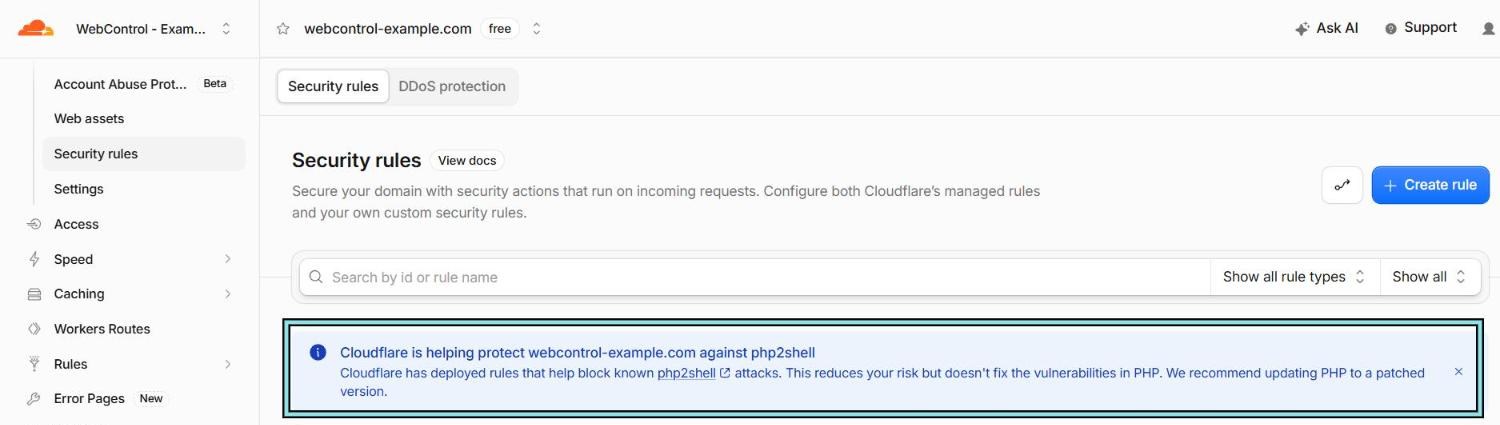
Rule #6 also blocks known attempts against CVE-2026-115560, as long as you haven’t renamed PHP’s upload progress field (session.upload_progress.name).
The rule IDs
You’ll see these in your security events when Cloudflare blocks an attempt, and you can filter on them to see every attempt against your site.
Free plan (Cloudflare Managed Free Ruleset):
4e315666e8e344cdb64119a3b5ccf32f00c10e6cc4da4bd08722adeebcd9598448ddf592361e4fdb97a8a85982dab6913556683d512a47f2937899c524b1a4c6da07c85852e34625bb478496302ede4619373a83abb840e18ab3ce5a7975ce1b07f0b6ddaabf40b1b2042dade8d613fa
Pro, Business and Enterprise (Cloudflare Managed Ruleset):
c1d409ad838f47f59446f21cc438d5ddf9a45927414245e3a64bb12d0a0c2f64771c654ae1154d4daa72f4e1545d163c217005865f0145f392300bac212afcc938efdb17ea594501bb55a1d71867b12e4148ae686fdb4d01be673fab9d9c073d1389aa259617437392ce149c48143645
See the attempts against your site
- In Cloudflare, open your domain and go to Security → Analytics → Events.
- Add a filter on Rule ID, and paste an ID for your plan from the lists above.
- Set the time range to the last 7 days (or since 17 October).
Our free Cloudflare dashboard shortcuts take you straight to that page for your domain.
Cloudflare’s own advice matches ours: these rules lower the risk, but they don’t fix the flaw, and attackers are already changing their requests to slip past WAF rules. They also can’t help with traffic that reaches your server without going through Cloudflare. Patch PHP anyway. (Rule IDs from Cloudflare’s announcement, checked 26 October 2026.)
What we did
Our servers run Debian’s own PHP packages, and Debian had fixed packages ready on release day. By 9am the next morning (22 October, Sydney time), about eight hours after PHP’s public release, every one of our servers was on PHP 8.4.27, and each had been checked for signs of compromise. (All clean.)
On top of that, our WordPress servers only accept web traffic from Cloudflare, so the new WAF rules sit in front of every request.
That’s the point we keep coming back to: patching, a WAF and origin lockdown are layers. Any one of them can fail. Together they buy you time when something like PHP2Shell drops overnight.
Need a hand?
If you’re not sure what PHP version you’re on, your host isn’t answering, or you’d like Cloudflare and origin lockdown set up properly, get in touch. Checking this is quick, and it’s a lot cheaper than cleaning up afterwards.
Updates
- 26 October 2026: added what the attacks have actually achieved so far (lots of attempts, no confirmed break-ins as of 23 October), and the follow-up flaw CVE-2026-115560, which the 21 October patches don’t fix. Cloudflare’s rule IDs re-checked: no changes. We’ll update this post when PHP releases the fix for CVE-2026-115560.