Here’s a question that sounds boring until it’s 11pm and a customer can’t get into your website: what’s that rule called, and what does it actually do?
When Cloudflare blocks or challenges a request, the rule’s name is what you see in Security → Analytics → Events. It’s also what the next person sees when they open your rules list and try to work out what’s safe to change. A good name answers “why did this happen?” before you’ve even opened the rule. A bad one sends you digging through expressions while the phone rings.
Our own rules were a mess
I went through the custom rules on our own domain this week. On the Free plan you get five, and we use all five. Here’s what they were called:
block - /wp-login.php and /wp-admin (except admin-ajax.php) unless trusted IPblock - unwanted countriesblock bots - stageblock bad files or foldersstaging: only our addresses may reach staging and dev
The first one is fine. The rest show every mistake I’d tell a client not to make:
- “block bots – stage” doesn’t block anything. Its action is Managed Challenge, and it only applies to search engines and other well-behaved bots on every host except www (in practice, our staging and dev sites). The name was right once, and then the rule changed and the name didn’t.
- “block bad files or folders” matches exactly one file:
/xmlrpc.php. “Bad files” tells you nothing. - “unwanted countries”: which ones? Wanted by whom? Decided when?
- Three different styles: “block – thing”, “block thing – thing” and “staging: sentence”. When you scan a list, the pattern is half the information.
The convention I use now
Every rule name follows the same shape:
action | scope | what it matches (exceptions)- Action comes first, and it must match what the rule really does:
block,challenge,skip,log,rate limit. If you change the action, change the name in the same edit. - Scope is which hostnames it applies to:
all hosts(or justall),www,not www,staging+dev,api. Most rules quietly apply to one host, and that’s exactly what you forget. - What it matches is the plain-English version of the expression, including the exceptions. Exceptions are what break things, so they belong in the name.
Here are our five again, renamed:
| Before | After |
|---|---|
| block – /wp-login.php and /wp-admin (except admin-ajax.php) unless trusted IP | block | www | wp-login + wp-admin (not admin-ajax) unless $trusted_ips |
| block – unwanted countries | block | all | countries we don't serve (reviewed 2026-10) |
| block bots – stage | challenge | not www | verified bots (keep crawlers off non-prod) |
| block bad files or folders | block | all | /xmlrpc.php |
| staging: only our addresses may reach staging and dev | block | staging+dev | everyone not on our IPs |
Now the list reads like a summary of our security policy. Anyone can look at it and tell what’s blocked, where, and for whom.
Here is the same convention on our demo domain, used for the examples in these posts:
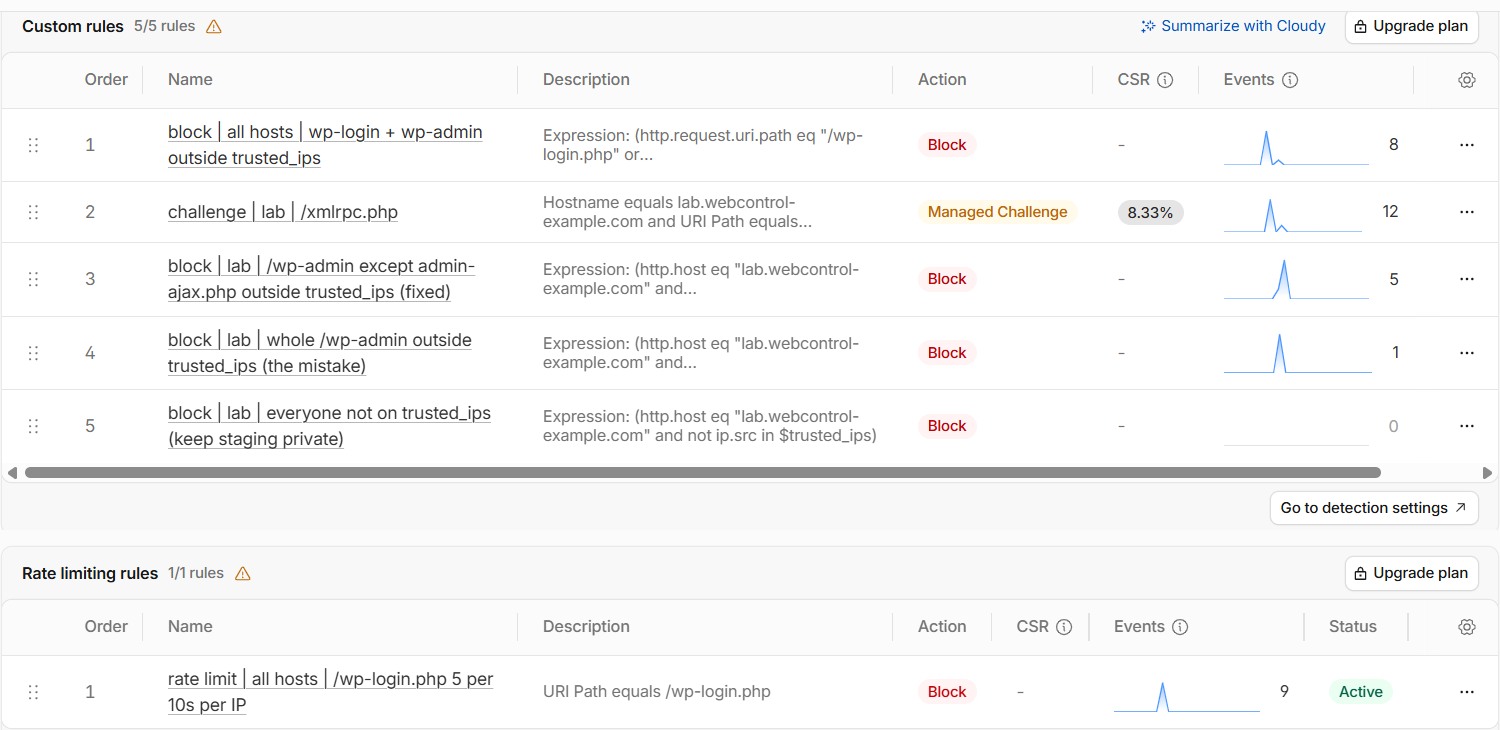
And this is where it pays off. When something is blocked, the event names the rule, and the name tells you what happened without opening it:
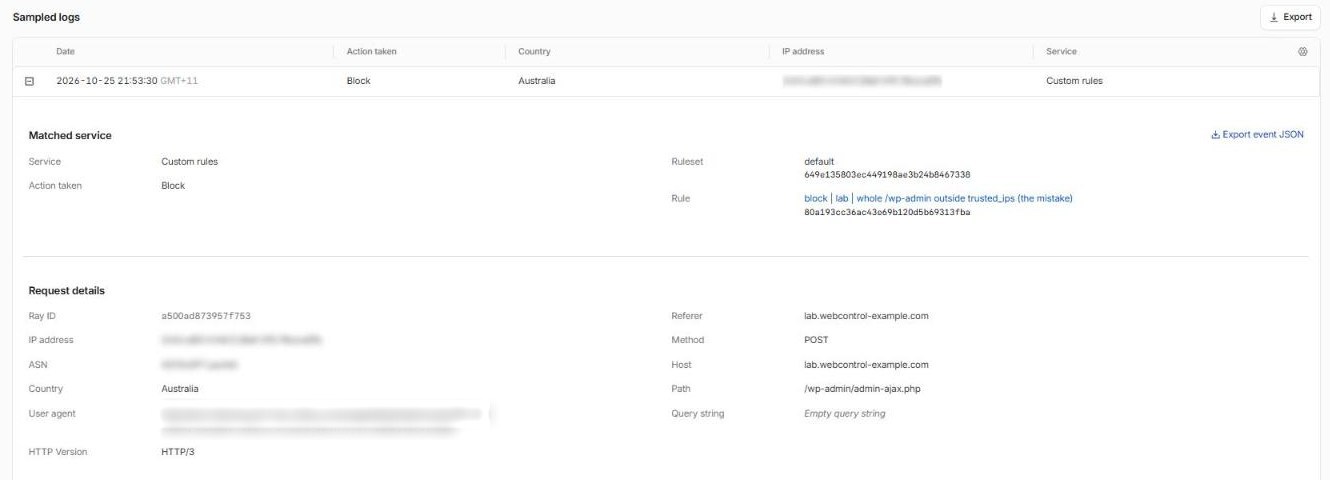
A few more rules for rule names
Name the List in the rule. unless $trusted_ips or outside trusted_ips tells you there’s a List to check, and which one. (More on naming Lists in How to use Lists in Cloudflare.)
Use the same names on every domain. If you look after ten zones, the login rule should be called the same thing on all ten. Then a search of Security Events, or a script, finds it everywhere.
Keep the “why” short, or somewhere else. A date or a ticket number in brackets is fine: (reviewed 2026-10), (INC-0142). The full story belongs in your change log or runbook, not a 300-character rule name.
Order matters, so make it visible. Cloudflare runs custom rules from top to bottom, and the first one that blocks or challenges a request wins. I keep skip rules at the top, then the narrow blocks, then the broad ones. (More on choosing actions in Block, challenge or skip?)
No “test”, “new”, “temp” or “Alan’s rule”. Every rule called “temp” I’ve ever found had been there for years.
Use the same idea everywhere else. DNS records, Lists and API tokens need good names too. I cover those in Naming conventions for DNS records, Lists and API tokens.
Make the name match after every edit. This is the one that caught us. Renaming takes ten seconds. Working out what a misnamed rule really does, mid-incident, takes a lot longer.
A wish for Cloudflare: comments and tags everywhere
Part of the reason rule names get so long is that the name is the only place to write anything. A custom rule has its name, its expression and its action, and that’s it. There’s nowhere to say why it exists, who asked for it, or when it should be reviewed.
Cloudflare has already solved this in one place. DNS records have a comment box on every plan, and paid plans add tags (like owner:marketing or env:staging) that you can filter by. Lists have a description, and each entry in a List can have its own comment. It works really well.
So, Cloudflare, if you’re reading: please give us the same comment box and tags on WAF rules, rate limiting rules, redirect and transform rules, configuration rules and API tokens. Then the name can stay short (block | all | /xmlrpc.php) and the comment can carry the story (“Old pingback abuse. Nothing on the site uses XML-RPC. Review 2027-04.”). And a tag like env:staging on every staging rule in every zone would make cleaning up after a project a two-minute job.
Until then, keep the name short and structured, and keep the “why” in your change log.
Why it matters more on small plans
With only five custom rules on Free (20 on Pro), people cram several jobs into one rule. That’s fine, but then the name is the only documentation the rule has. A name like “misc blocks” on a rule that quietly handles your admin area, a bad bot and an old redirect is how you end up with something like our contact form silently rejecting customers.
Next time you’re in your Cloudflare dashboard, open your custom rules (Security → Security rules in the current dashboard) and read the names out loud. If you can’t say what each one does without clicking into it, rename it today.
Want a second pair of eyes on your rules? Get in touch. We’ll happily tell you which of yours are called “block bots – stage”.