
How many domain names does your business own? For most small businesses the answer is one. It should usually be a few more.
That’s not because anyone enjoys paying renewal fees. It’s because domains are part of your security, not just your marketing. We hold several variations of our own name for exactly the reasons below.
Which domains to own
Say your website lives at webcontrol-example.com. The variations worth owning are usually:
- The other common endings, such as webcontrol-example.net and webcontrol-example.org, plus the Australian versions of your name (more on
.aubelow) - Short or alternative spellings people actually use for your name, such as “tech” for “technology”
- Names one letter away from yours, especially where the swapped letter changes little.
webcontrol-exarnple.com(“rn” instead of “m”) looks almost identical in an email.
To see what’s out there, a free tool called dnstwist generates the lookalikes for a name and checks which are registered. For our demo domain it came up with 14,639 variations:
$ dnstwist --registered webcontrol-example.comApart from two odd splits that are really someone else’s domain (webcontrol-exam.ple.com lives under ple.com), none were registered, which is what you’d expect for a brand-new name. For an established business, that “registered” list is the one to read carefully.
Every one of them should send visitors straight to https://www.webcontrol-example.com/ with a permanent 301 redirect.
Why bother?
1. Typo-squatting. Scammers register domains that are one typo away from a real business and use them for fake invoices, phishing emails and look-alike websites. If you own the obvious variations, they can’t.
2. The .au direct namespace. Since 2022, Australians can register names directly under .au, so a business at webcontrol-example.com.au can also hold webcontrol-example.au. If you never claimed your .au name, someone else may be able to. Check it today.
3. Customers guess. People type what they remember. A redirect catches those visits instead of losing them to an error page, or worse, to someone else’s site.
Do redirects properly
If you’re going to own extra domains, make them work properly:
- Use a 301 (permanent) redirect, not a frame or a “parked” page. Search engines then understand that your main domain is the real one.
- Redirect both
webcontrol-example.netandwww.webcontrol-example.net, over HTTP and HTTPS. - Redirect straight to the final address in one hop (
https://www.webcontrol-example.com/in our example), not through a chain. - If the domains are on Cloudflare, a Redirect Rule or Bulk Redirects handles all of this without needing a web server at all.
Chains creep in without anyone noticing. Our own demo domain had one: the plain http:// address went to https:// first, and only then to www:
$ curl -sI http://webcontrol-example.com/
HTTP/1.1 301 Moved Permanently
Location: https://webcontrol-example.com/
One Redirect Rule (Rules → Redirect Rules) fixed it. Now every request for the bare name, HTTP or HTTPS, goes to the final address in one hop, keeping the page and any query string:
$ curl -sI http://webcontrol-example.com/
HTTP/1.1 301 Moved Permanently
Location: https://www.webcontrol-example.com/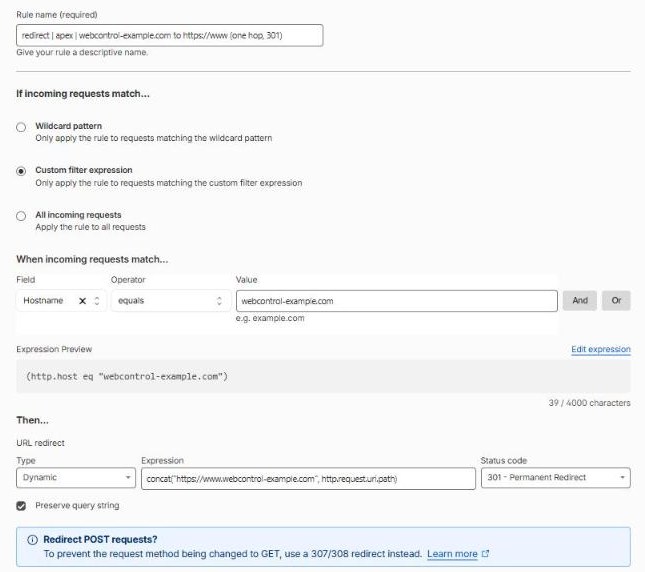
Don’t forget email
This is the part almost everyone misses. A domain you don’t send email from can still be used to send fake email, unless you tell the world it shouldn’t.
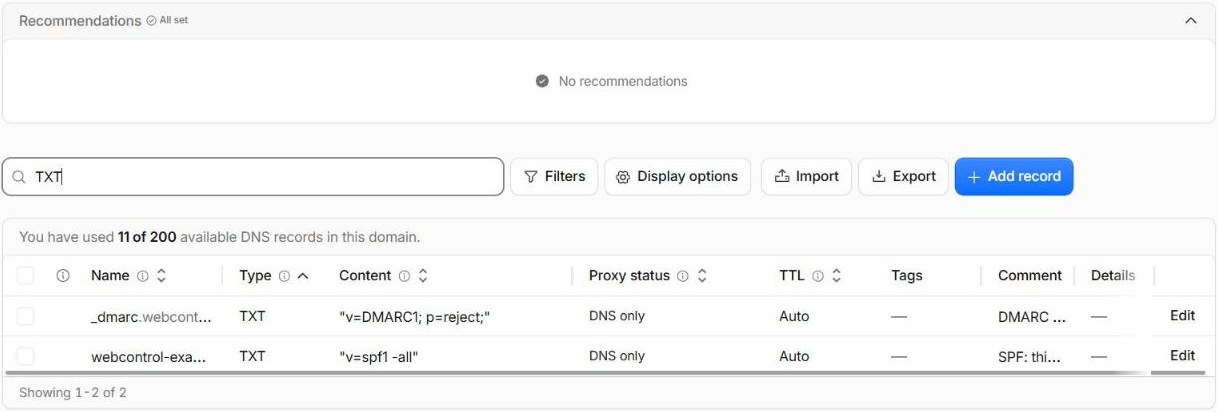
For every domain that never sends email, add these DNS records:
TXT  @       "v=spf1 -all"
TXT  _dmarc  "v=DMARC1; p=reject;"
MX   @       0 .
In plain English: “No server is allowed to send mail for this domain, reject anything that claims otherwise, and this domain doesn’t receive mail either.” Receiving mail servers will then bin spoofed emails using your look-alike domains.
Cloudflare nudges you too: until there’s a DMARC record, its DNS page recommends adding one.
Keep them safe
- Turn on auto-renew, and make sure the card on file won’t expire unnoticed. Expired domains get snapped up within days.
- Use registrar lock and two-factor login on your registrar account.
- Keep the registrant details correct. For
.audomains, eligibility (like your ABN) matters, and out-of-date details can cause problems at renewal. - Keep a list of every domain you own, where it’s registered and when it renews.
Want help checking which variations of your name are still available, or locking down the ones you have? Get in touch.