Good names are the cheapest documentation you’ll ever write. Here’s how I name the things in a Cloudflare account that tend to pile up without anyone noticing: DNS records, Lists, API tokens, Access apps and hostnames. (Firewall rules have their own post: Naming conventions for Cloudflare WAF rules.)
The goal is the same everywhere. Someone who has never seen your setup should be able to tell what a thing is for, what breaks if they delete it, and who to check with before they do. That someone is usually you, in a year.
DNS records: you can’t rename them, so comment them
A DNS record’s name is its address. You can’t call it “the record for the booking system”, because it has to be book.webcontrol-example.com or whatever the service needs. So the naming happens in two places.
First, pick hostnames that explain themselves.
- Name by purpose, not product:
book.,shop.,help.rather thancalendly.orzendesk.. If you change providers, the name still makes sense, and you’re not advertising your suppliers. - Keep non-production obvious:
staging.anddev., never something cute. Then it’s easy to write one rule that keeps them private. - Avoid hostnames that name a server, like
web01.webcontrol-example.com, on anything public. You’re telling the world where your origin is (more on that in orange cloud vs grey cloud).
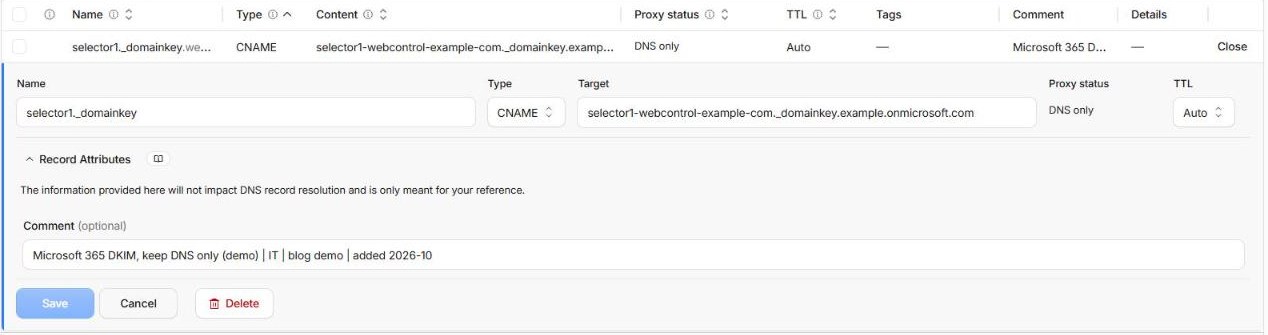
Second, use record comments. Every Cloudflare plan lets you add a comment to each DNS record (up to 100 characters on Free, 500 on paid plans). Almost nobody does. I use a simple pattern:
what it's for | owner | change ref | added YYYY-MM
Microsoft 365 DKIM | IT | CHG-1042 | added 2026-03
Mailchimp domain verification | marketing | email 2025-11-04 | added 2025-11
Old booking system, remove after 2026-12 | web team | CHG-0871 | added 2024-02
That last one is the important kind. A comment with a removal date turns “nobody knows what this is” into a to-do item.
Here’s the pattern on a real record. The list view cuts comments short, so open the record to read the whole thing:
On Pro and above you also get tags: up to 20 name:value pairs per record, such as owner:marketing, env:staging or change:CHG-1042. Tags are searchable, so “show me every staging record” or “show me everything that change added” becomes one filter.
Add a change reference and an owner
A name or comment tells you what something is. It can’t tell you why it was set up that way, who agreed to it, or who to ask before changing it. Two short additions fix that, and they belong on everything in this post, not just DNS.
The change reference. If the change came from a ticket, job number or change request, put the number in: CHG-1042, #5531, JOB-88. A comment only holds 100 characters on Free, but the ticket holds the whole story: who asked for it, who approved it, what was tested and how to undo it. A year later, “why is this here?” is a quick search instead of a guess.
No ticket system? Most small businesses don’t have one, and that’s fine. Point to whatever records the approval: email 2025-11-04 for the email where the owner said yes, or the date of the entry in your change log. What matters is that someone can find the decision again.
The owner, so people know who to ask. Before anyone deletes a record, edits a List or rotates a token, they should know who to check with first. Use a team or role rather than a person’s name: marketing, IT, accounts, web agency. People change jobs and leave; the team usually stays. If something really does belong to one person, write their role (ops manager) and keep the name in the ticket.
Lists: you can’t rename them at all
Cloudflare List names can only use lowercase letters, numbers and underscores, and once created they can’t be renamed. So choose carefully:
- Say whether it allows or blocks:
trusted_ips,blocked_ips, notipsorlist1. - Be specific if you’ll have more than one:
office_ips,monitoring_ips,payment_webhook_ips. - Use the description to say which rules use it, who owns it and the change reference.
- Each entry in a List can have its own comment. Use it for where the address came from and who asked for it:
office NBN static IP | accounts | CHG-1107. Otherwise in two years you’ll have 40 addresses and no idea which ones are still yours.
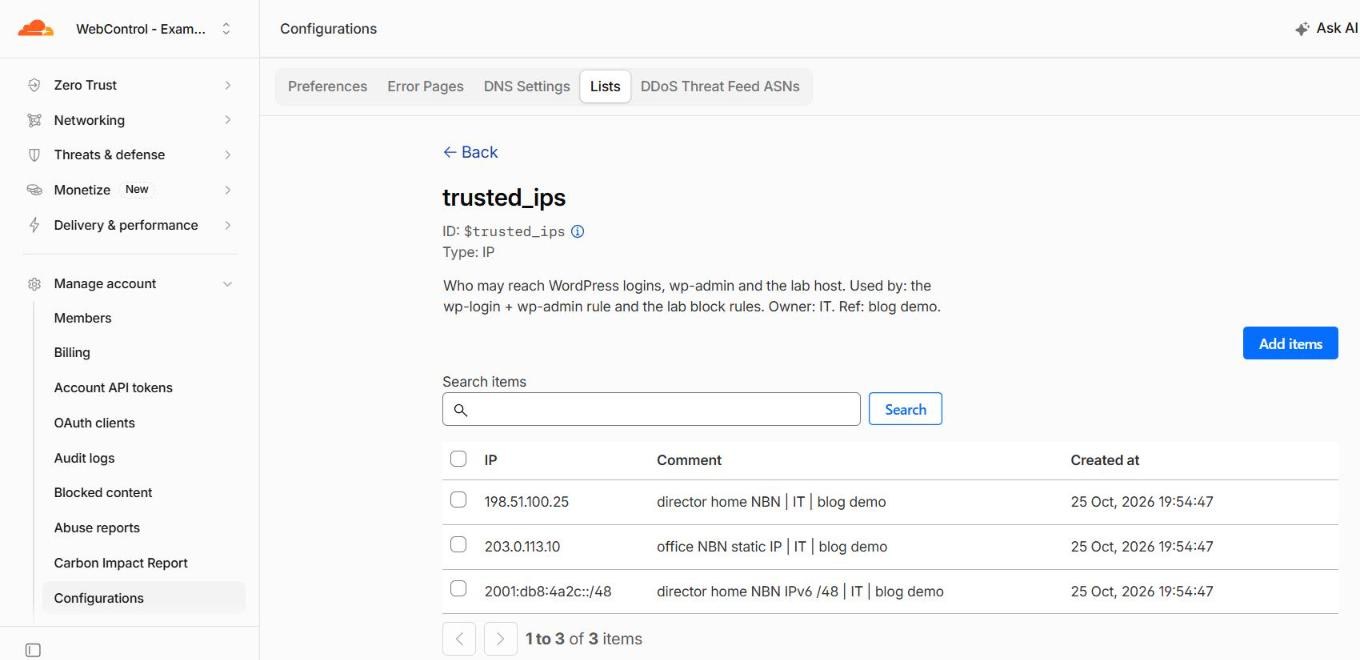
I go into Lists properly in How to use Lists in Cloudflare.
API tokens: say what breaks
Token names are free text, so there’s no excuse for “token (2)”. The pattern I use is what uses it | where it runs | what it can do, for example certbot | web01 | DNS edit on webcontrol-example.com.
Tokens have no comment box, so the owner and change reference have to live somewhere else. Add the reference to the name if it fits (certbot | web01 | DNS edit on webcontrol-example.com | CHG-1042), and put the owner and the approval in the same place you keep the token itself, such as its password manager entry. Whoever rotates it next will know who to tell. More in Stop using your Cloudflare Global API Key.
Access apps, tunnels and the rest
If you use Cloudflare Zero Trust, the same idea applies:
- Access applications:
env | app | who gets in, e.g.prod | wp-admin | staff,staging | all | agency + staff. - Tunnels: name them after the machine they run on and its purpose:
web01-prod,nas-office. When a tunnel shows as down, you know which box to look at. - Access groups: name the people, not the rule:
staff,contractors-web,accounts-team.
Write the convention down
A convention that only lives in your head isn’t a convention. Put one page in your runbook or shared drive that says:
- the pattern for each kind of thing (rules, records, Lists, tokens, apps)
- a couple of examples of each
- the short words you use for scope:
all,www,staging,api - where the change reference and owner go for each kind of thing, and what counts as approval (a ticket, an email, a yes from the owner)
- the list of owners and how to reach them, so “check with marketing” leads to a real person this year
Then hand it to whoever touches your Cloudflare account next: staff, your web developer, us. Consistency matters more than which pattern you choose.
Start small
You don’t need a weekend project. Next time you’re in the dashboard for any reason, fix the names and comments on whatever you touch. Within a few months, your account will explain itself.
Want us to tidy up a messy account and leave you with a naming guide that fits it? Get in touch.