
Open the DNS page of any domain on Cloudflare and you’ll see a little cloud next to most records. Some are orange, some are grey. That tiny icon decides whether Cloudflare is protecting a hostname at all, and it’s one of the most common things we find set wrong.
What the two clouds mean
Orange cloud (Proxied): when someone looks up the name, Cloudflare answers with its own IP addresses. Visitors connect to Cloudflare, and Cloudflare connects to your server. Your WAF rules, caching, SSL settings, bot protection and DDoS protection all apply, because the traffic actually goes through Cloudflare.
Grey cloud (DNS only): Cloudflare just answers the DNS question with your server’s real IP address, like any other DNS provider. Visitors connect straight to your server. None of your Cloudflare security settings apply to that traffic. None.
That’s the bit people miss. A grey-cloud record isn’t “Cloudflare with fewer features”. For web traffic, it’s no Cloudflare at all.
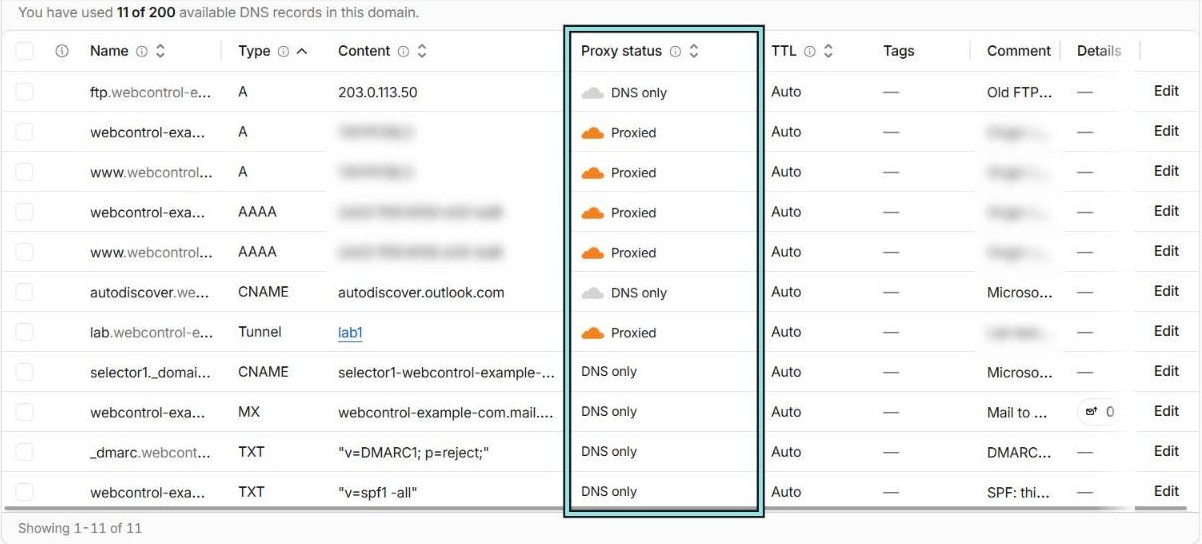
ftp record uses a documentation address.)What can be orange
Only A, AAAA and CNAME records can be proxied, and proxying is for web traffic. Everything else, like MX and TXT records, is always DNS only. That’s normal and correct: your email doesn’t go through Cloudflare’s web proxy.
The grey cloud that gives you away
Here’s the classic mistake. Your website, www, is orange. Lovely. But there’s also a grey record for mail, ftp, cpanel or direct, and it points at the same server.
Anyone can look those names up. Attackers do, automatically, and they also use DNS history sites that remember what your records looked like years ago. Once they have your server’s real IP address, they can skip Cloudflare entirely and attack the server directly, where none of your rules apply.
The fix has two parts:
- Don’t publish your web server’s IP in grey records. Send mail to a separate mail service or server. Use a different address for things like SSH. Delete records you don’t use.
- Lock the server down so it only accepts web traffic from Cloudflare, so even if the IP leaks, there’s nothing to talk to. We’ve written the whole process up in How to lock down your origin server behind Cloudflare.
Records that should be grey
Orange isn’t always right either. Some records only work when they’re DNS only, and CNAMEs are where this catches people out.
Here’s why. When a CNAME is grey, anyone who looks it up sees exactly what you entered: “this name points at that name”. When a CNAME is orange, Cloudflare hides it. Cloudflare looks up the target itself and answers with its own IP addresses instead. That’s exactly what you want for a website. But some CNAMEs exist only so another service can check “does this name point at us?”, or so it can find a TXT record sitting behind the CNAME. Proxy one of those and the service gets back Cloudflare’s IP addresses instead of the CNAME it’s looking for, so the check fails.
Take the Microsoft 365 autodiscover record. Grey, a lookup returns:
CNAME autodiscover.webcontrol-example.com → autodiscover.outlook.comOrange, the same lookup returns:
A autodiscover.webcontrol-example.com → 104.21.x.x (a Cloudflare address)Microsoft is looking for the first answer and gets the second.
Leave these as DNS only:
- Microsoft 365 records. Outlook uses
autodiscoverto set itself up, and the Microsoft 365 admin centre checks it when you add or verify your domain. Proxied, the admin centre reports the record as missing or wrong, and Outlook can struggle to find mailboxes. The same applies toenterpriseregistrationandenterpriseenrollmentif you manage devices with Intune, and to the two DKIM records,selector1._domainkeyandselector2._domainkey. DKIM is the costly one to get wrong. Receiving mail servers look for a TXT record behind that CNAME. If the CNAME is proxied, they find nothing, so your email fails DKIM and is more likely to land in spam. - Certificate validation records (
_acme-challenge). Some setups prove you own a domain by pointing_acme-challenge.webcontrol-example.comat another service with a CNAME. That service can then create the TXT records needed to issue SSL certificates for you. You’ll see this with some hosting control panels, certificate tools and platforms that host a site on your domain. The certificate authority, such as Let’s Encrypt, looks for the TXT record behind the CNAME. If the CNAME is proxied, the certificate authority finds no TXT record and won’t issue the certificate. Certificates renew automatically every couple of months, so you often won’t notice until a renewal fails, the certificate expires and visitors start seeing security warnings. - Other “prove you own this domain” CNAMEs. Email platforms like Mailchimp, SendGrid and HubSpot ask for CNAMEs to verify your sending domain and sign your mail with DKIM. Some services also offer a CNAME instead of a TXT record to verify ownership. Same rule: they’re checking where the name points, and a proxied record gives them the wrong answer.
- Mail servers your MX records point to (for example
mail.webcontrol-example.comif you run your own). - Anything that isn’t a website: SSH, game servers, VPN endpoints, remote desktop. Cloudflare’s normal proxy only handles web traffic. Those services need something like Cloudflare Tunnel or Spectrum instead, or simply a separate IP address you don’t mind being known, behind a firewall.
A simple rule of thumb: if a service gave you a CNAME to add and it isn’t the address of a website, set it to DNS only. And if the provider’s setup guide says “DNS only” or “turn off the proxy”, believe it.

A quick audit you can do today
- Open your domain in Cloudflare and go to DNS → Records.
- For every grey A or AAAA record, ask: is this IP the same as my web server’s? If yes, that’s a leak.
- For every orange record, ask: is this actually a website? If not, check it still works. Look hard at any CNAME pointing at Microsoft, an email platform or a certificate service, and anything with
_domainkeyor_acme-challengein its name. Those should be grey. - Delete anything nobody can explain. (Old records pointing at services you no longer use are a risk of their own. See Dangling DNS: how old records let someone else use your domain.)
- Add a comment to every record you keep, saying what it’s for. Cloudflare lets you do this on every plan.
One more thing: TTL
Proxied records always use a TTL of “Auto”, which is five minutes. You can’t change it, and you don’t need to: because visitors are pointed at Cloudflare rather than your server, you can move servers behind an orange record and the change is almost instant. That’s a nice side benefit when you move a website to a new server.
Not sure which of your records should be which? Send us your domain and we’ll take a look.