Every time your website sends a page to a browser, it can attach a few lines of instructions: “only ever load me over HTTPS”, “don’t let other sites put me in a frame”, “don’t guess what kind of file this is”. These are security headers. They’re invisible, free, and most small business sites don’t send any of them.
Here are the ones worth having, in plain English, and how to add them with Cloudflare without touching your server.
The headers that matter
Strict-Transport-Security (HSTS). Tells the browser: “for the next X months, only ever connect to me over HTTPS, even if someone types http://”. It stops a whole class of attacks on public Wi-Fi where someone downgrades your visitor to an insecure connection.
X-Content-Type-Options: nosniff. Tells the browser not to guess what a file is. Without it, a file uploaded as an “image” could be treated as a script. One line, no downside.
Content-Security-Policy (CSP), at least frame-ancestors. A full CSP lists every place your pages are allowed to load scripts, styles and images from. That’s powerful but takes work to get right. Start with just one part: frame-ancestors 'self', which stops other websites from loading your pages inside an invisible frame and tricking visitors into clicking things (called clickjacking).
You’ll also see X-Frame-Options on checklists. It’s the older way of doing the same job. frame-ancestors replaces it, and checkers such as securityheaders.com accept it in its place, so you don’t need both.
Referrer-Policy. Controls how much of your page address is passed on when a visitor clicks a link to another site. strict-origin-when-cross-origin is a sensible choice: other sites see your domain, not the full address (which might include search terms or order numbers).
Permissions-Policy. Lets you switch off browser features your site doesn’t use, like the camera, microphone and location, so a malicious script injected into your page can’t ask for them.
Two you can skip
You’ll still see these recommended in older guides:
- X-XSS-Protection controlled a filter that modern browsers have removed. It’s no longer useful and can cause problems in old ones.
- Expect-CT is obsolete. Certificate Transparency is now enforced by browsers anyway.
Adding them with Cloudflare
Cloudflare can only add headers to traffic that goes through it, so check that your site’s DNS records are set to Proxied (the orange cloud). On a DNS-only record, none of this applies.
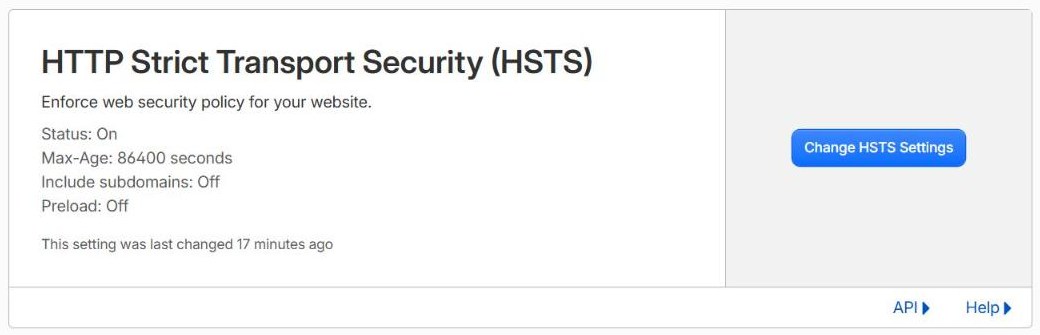
HSTS has its own setting: SSL/TLS → Edge Certificates → HTTP Strict Transport Security. Before you turn it on, make sure every subdomain works over HTTPS, because once a browser has seen HSTS, it won’t let visitors through on HTTP until the time runs out. Start with a short max-age (a day or a week), check nothing breaks, then raise it to six months or a year. Only tick “include subdomains” and “preload” once you’re sure. Preloading is very hard to undo.
(HSTS only makes sense with a proper certificate set-up end to end. If your SSL/TLS mode isn’t Full (strict) yet, sort that out first.)
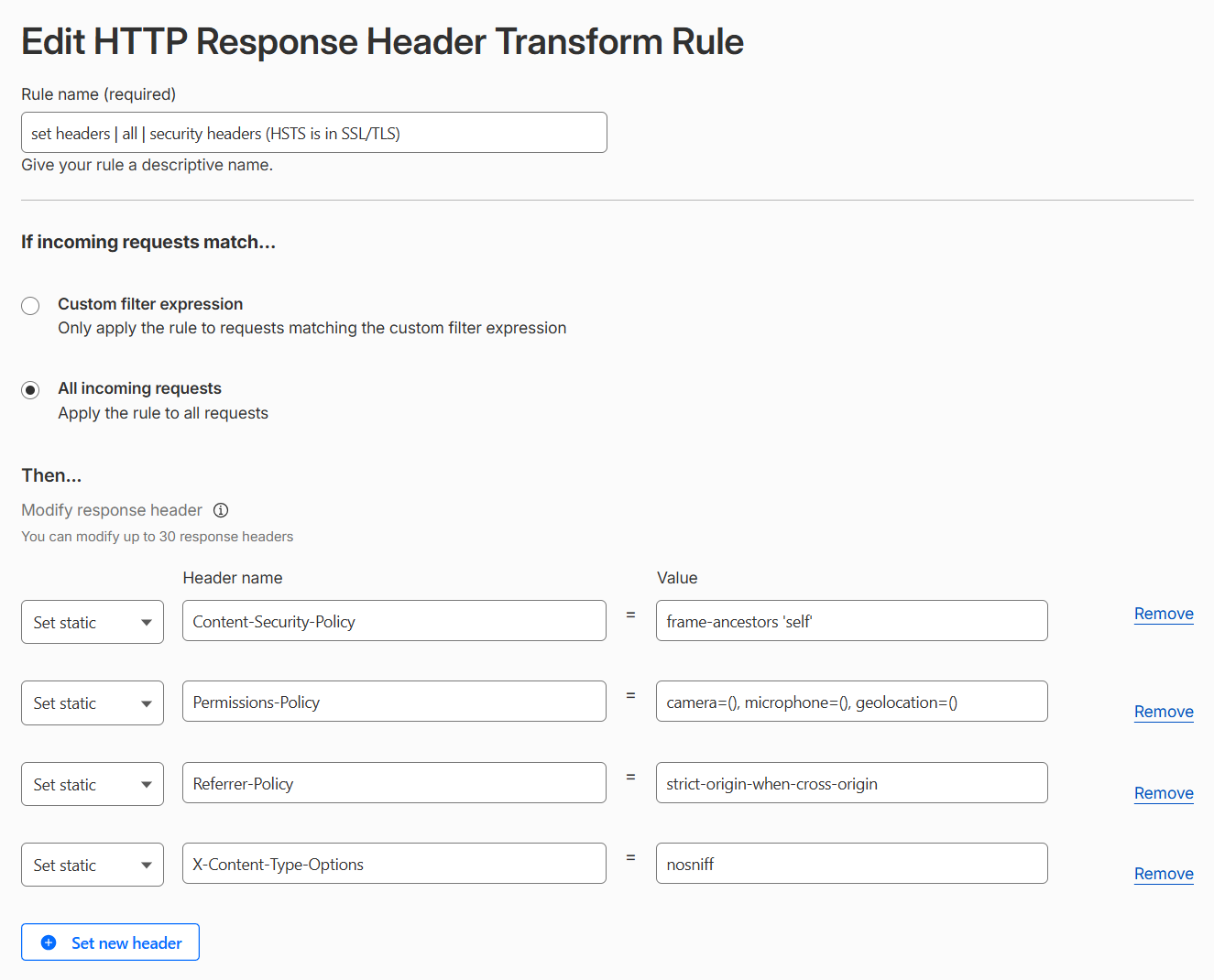
The rest can be added with a Response Header Transform Rule (under Rules → Overview, where Cloudflare now lists every rule type together), available on every plan. Create one rule for all incoming requests that sets these headers:
X-Content-Type-Options      nosniff
Referrer-Policy             strict-origin-when-cross-origin
Content-Security-Policy     frame-ancestors 'self'
Permissions-Policy          camera=(), microphone=(), geolocation=()
One check first: “set” replaces whatever your server sends. If your site already has a Content-Security-Policy (some security plugins add one), this rule would cut it down to the single frame-ancestors line. In that case, leave Content-Security-Policy out of the rule and add frame-ancestors 'self' to your existing policy instead.
Cloudflare also has a one-click Managed Transform called Add security headers. It’s better than nothing, but it still includes the two obsolete headers above and doesn’t set HSTS or CSP. We prefer our own rule, so we know exactly what’s being sent.
Name the rule properly so the next person knows what it does: set headers | all | security headers (HSTS is in SSL/TLS). (More on this pattern in how we name Cloudflare rules.)
Check your work
Open your site, then your browser’s developer tools, Network tab, click the page, and look at the response headers. Or from a terminal:
curl -sI https://lab.webcontrol-example.com/ | grep -iE "strict|content-type-options|referrer|security-policy|permissions"With the rule and HSTS in place, you should get all five back:
x-content-type-options: nosniff
strict-transport-security: max-age=86400
content-security-policy: frame-ancestors 'self'
permissions-policy: camera=(), microphone=(), geolocation=()
referrer-policy: strict-origin-when-cross-origin
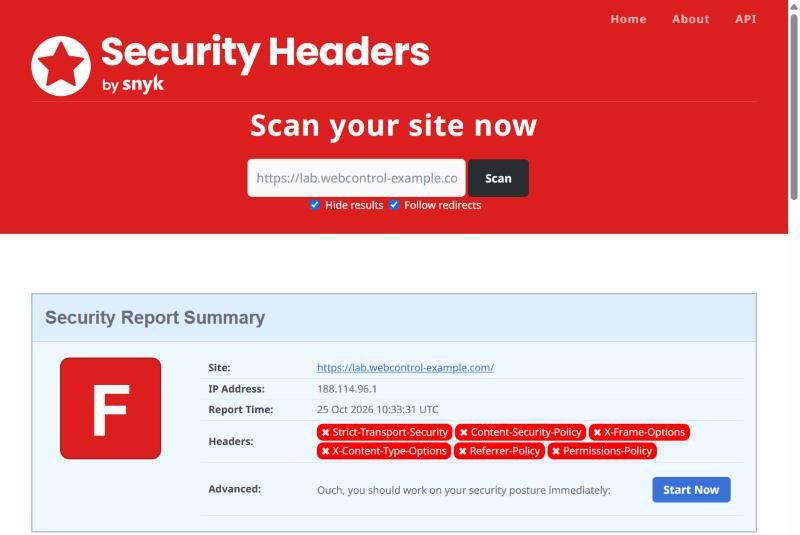
A free checker such as securityheaders.com gives you a grade too (tick “Hide results” so your scan isn’t listed publicly).
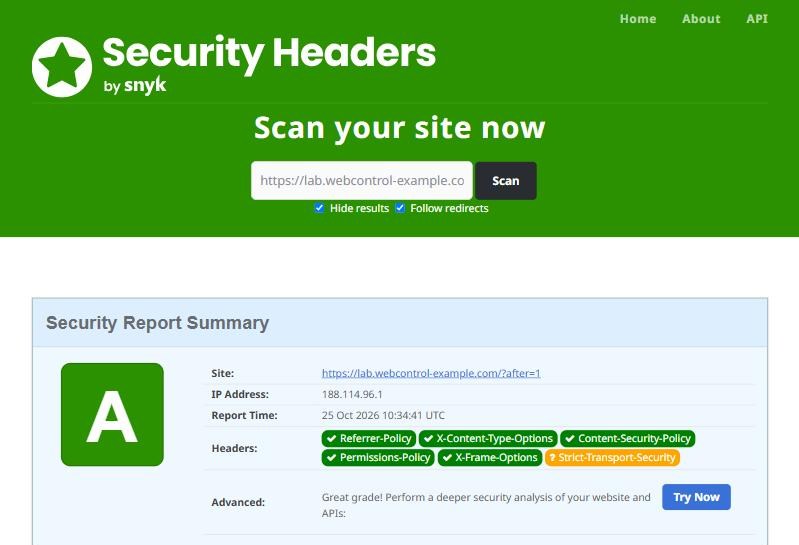
frame-ancestors covers it. HSTS is amber only because we started with a one-day max-age, as recommended above; it wants at least 30 days once you’re confident.Then click through the site and test your forms, payments and any embedded videos or maps. If something stops working, it’s usually frame-ancestors (if another site of yours embeds pages from this one) or Permissions-Policy (if a booking widget needs location). Adjust and test again.
Once these are in place, a full Content-Security-Policy is the next step up. That one’s a project, not a five-minute job. If you want help with it, get in touch.