We recommend Cloudflare to almost everyone. So it’s only fair to answer the question that comes up after every big outage: what happens to my website when Cloudflare goes down?
The short answer: for most small businesses, your website goes down too, until Cloudflare fixes it. The longer answer is about what you can do to make that hurt less.
It does happen
On 18 November 2025, Cloudflare had one of its biggest outages in years. Starting at 11:20 UTC (about 10:20pm in Sydney), a large share of sites behind Cloudflare started returning errors. Core traffic was mostly flowing again about three hours later, and everything was back to normal by 17:06 UTC.
It wasn’t an attack. A database permissions change caused a configuration file used by Cloudflare’s bot protection to double in size, which went over a built-in limit and crashed the software that handles traffic. Cloudflare published a detailed write-up the same day on its blog, which is worth a read if you’re curious.
Outages like that are rare, and Cloudflare is still far more reliable than the typical small business server. But “rare” isn’t “never”, so it’s worth planning for.
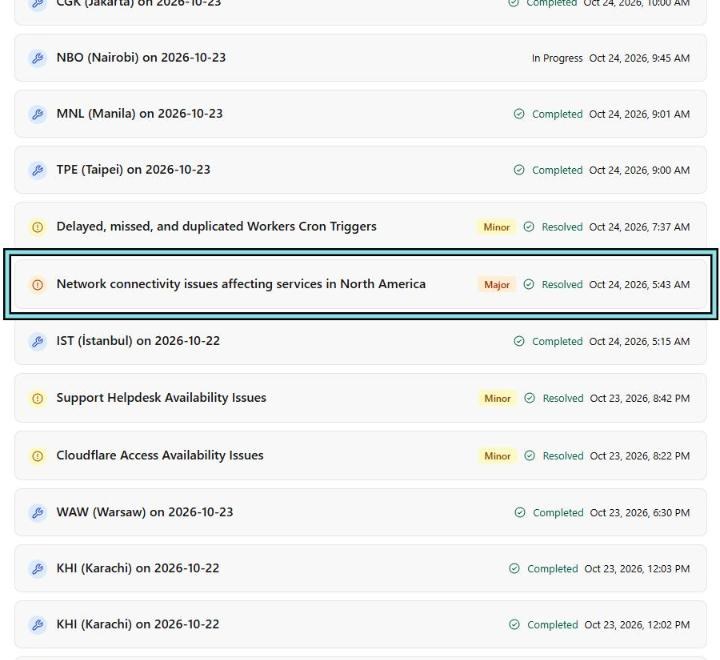
Smaller incidents are routine. In less than a day of Cloudflare’s status history, around the time we wrote this, there was a “Major” incident affecting services in North America, three minor ones and eight planned data-centre maintenance windows:
What actually breaks
- Websites behind Cloudflare’s proxy (orange-cloud records) show Cloudflare error pages.
- Cloudflare’s other services may be affected too. In November 2025 that included Turnstile (so forms using it couldn’t be submitted), Cloudflare Access logins and the dashboard itself.
- Your email is usually fine. Mail doesn’t go through Cloudflare’s web proxy, so as long as DNS answers, mail keeps flowing. (More on what’s proxied in orange cloud vs grey cloud.)
Should you just turn Cloudflare off?
During an outage, people’s first instinct is to log in and switch records to grey (DNS only) so traffic goes straight to their server. Think hard before you do:
- The dashboard may not work during the outage, so you might not be able to anyway.
- It exposes your server’s real IP address to the whole internet, permanently. DNS history sites will remember it. Once it’s out, you can’t take it back. That undoes the work of locking your origin down.
- If your origin is locked down properly, it only accepts traffic from Cloudflare, so going grey wouldn’t work anyway (that’s the point).
- It takes time to undo, and the outage may be over before your change has spread.
For most small businesses, the right move is to wait it out and communicate. A few hours of downtime every few years is a reasonable trade for the protection you get the rest of the time.
What you can do instead
1. Know where to look. Bookmark cloudflarestatus.com. When your site breaks, check there first, before you start changing things. It’s step one in our first-hour checklist for a reason.
2. Have a way to reach customers that doesn’t depend on the website. Your phone number on your Google Business Profile, your social channels, an email list. “Our website’s down, call us on…” is a perfectly good plan.
3. Don’t make every system depend on the same thing. If your website, your booking system, your status page and your staff logins are all behind Cloudflare, one outage takes out all of them. Keep at least one way of working (phone, email, a booking fallback) that doesn’t.
4. Make sure your monitoring is outside Cloudflare. An uptime monitor that tells you the site is down is only useful if its alerts don’t depend on the thing that’s down.
5. If you truly can’t be down, plan for it properly. For larger businesses, there are options: a second CDN, a static fallback page hosted elsewhere, multi-provider DNS. They cost money and add complexity, so they’re a business decision, not a technical one. One option we offer is a backup WAF: set up ahead of time and switched on only when you need it.
Write it down before it happens
Whatever you decide, put it in a short plan: who checks the status page, who posts the “we’re down” message, and who decides whether to wait or act. Five lines is enough. You don’t want to be inventing it at 10:20pm.
Not sure whether your website needs a backup WAF? Get in touch.